



Custom viewings scheduling tool
The challenge:
For letting agents, property viewings are the engine of the business, but managing them is traditionally one of the most chaotic parts of the job. Agents juggle availability across multiple team members, coordinate with applicants over phone and email, manually track who's confirmed and who hasn't shown up, and somehow try to plan an efficient route between properties scattered across the city.
Off-the-shelf calendar tools couldn't handle the nuances of property viewings. Ultralets needed a system that would bring structure to this process without slowing their team down.
The solution:
We built a purpose-designed Viewings Schedule directly into Ultralets' property management platform.
Rather than bolting on a generic calendar, every feature was designed around how letting agents actually work, from when a viewing block is created, through to the final report at the end of the month.

The results:
By bringing scheduling, communications, routing, and reporting into a single purpose-built system, Ultralets transformed viewings from their most admin-heavy process into one of their most efficient:

SMS reminders cut no-show rates by keeping applicants accountable

Automations turned a 20 minute process into a 30 second task

Self-service bookings reduced inbound phone calls and freed-up agent time for higher-value work

Comprehensive reporting replaced hefty spreadsheets with always-available, filterable data

Route optimisation reduced unnecessary driving time

Real-time visibility gave the office a clear picture of where every agent is and what they're doing, at all times
Features breakdown:
-
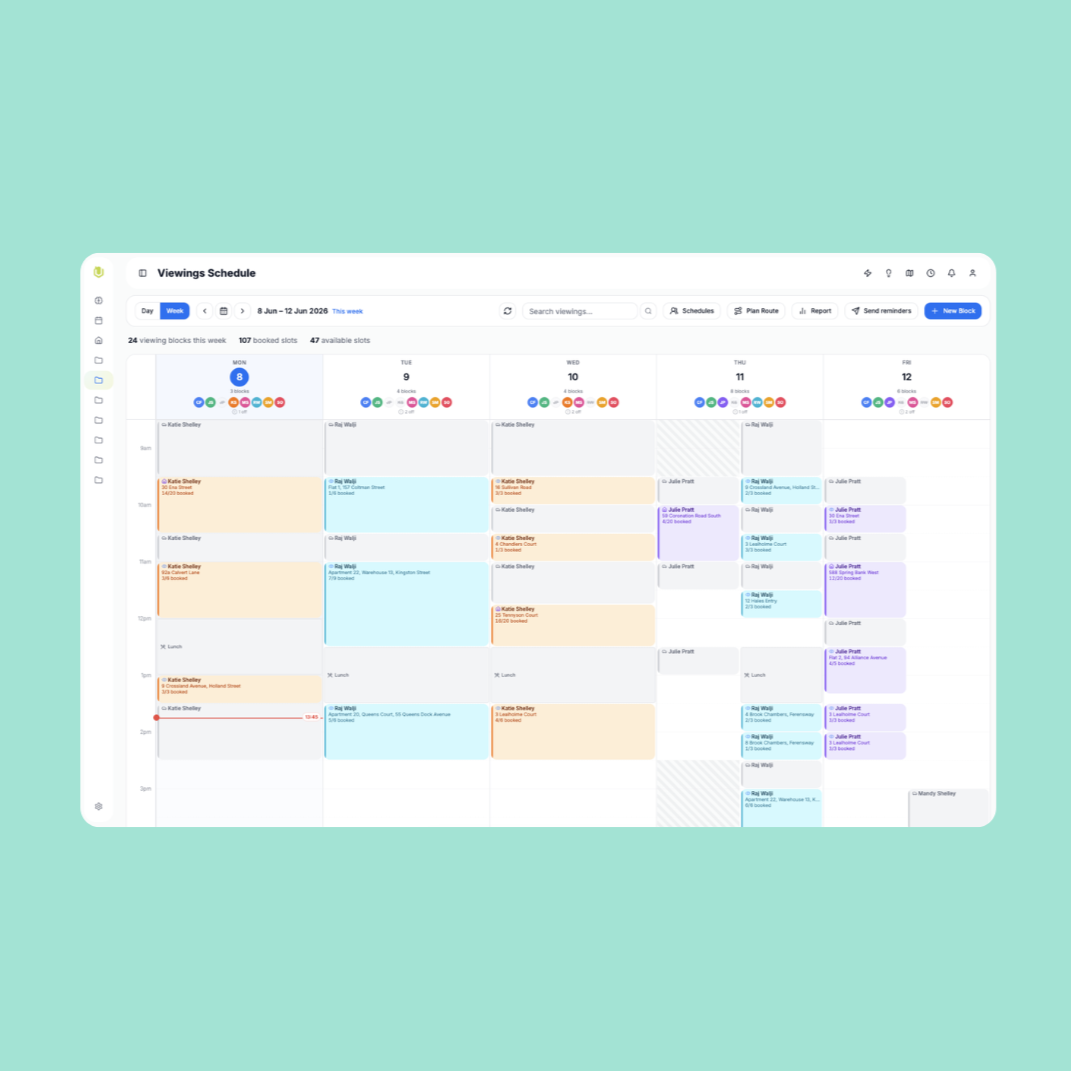
The schedule presents a clear, timeline-based view of every agent's day. Each agent gets their own row (in day view) or colour-coded column (in week view), with viewing blocks, travel time, meetings, and lunch breaks all visible at a glance.
Why it matters: Managers can see the entire team's diary in seconds. No more asking "are you free at 2 pm?" Availability gaps are immediately obvious. A live "now" indicator tracks the current time across the schedule, so the office always knows where agents should be.
-
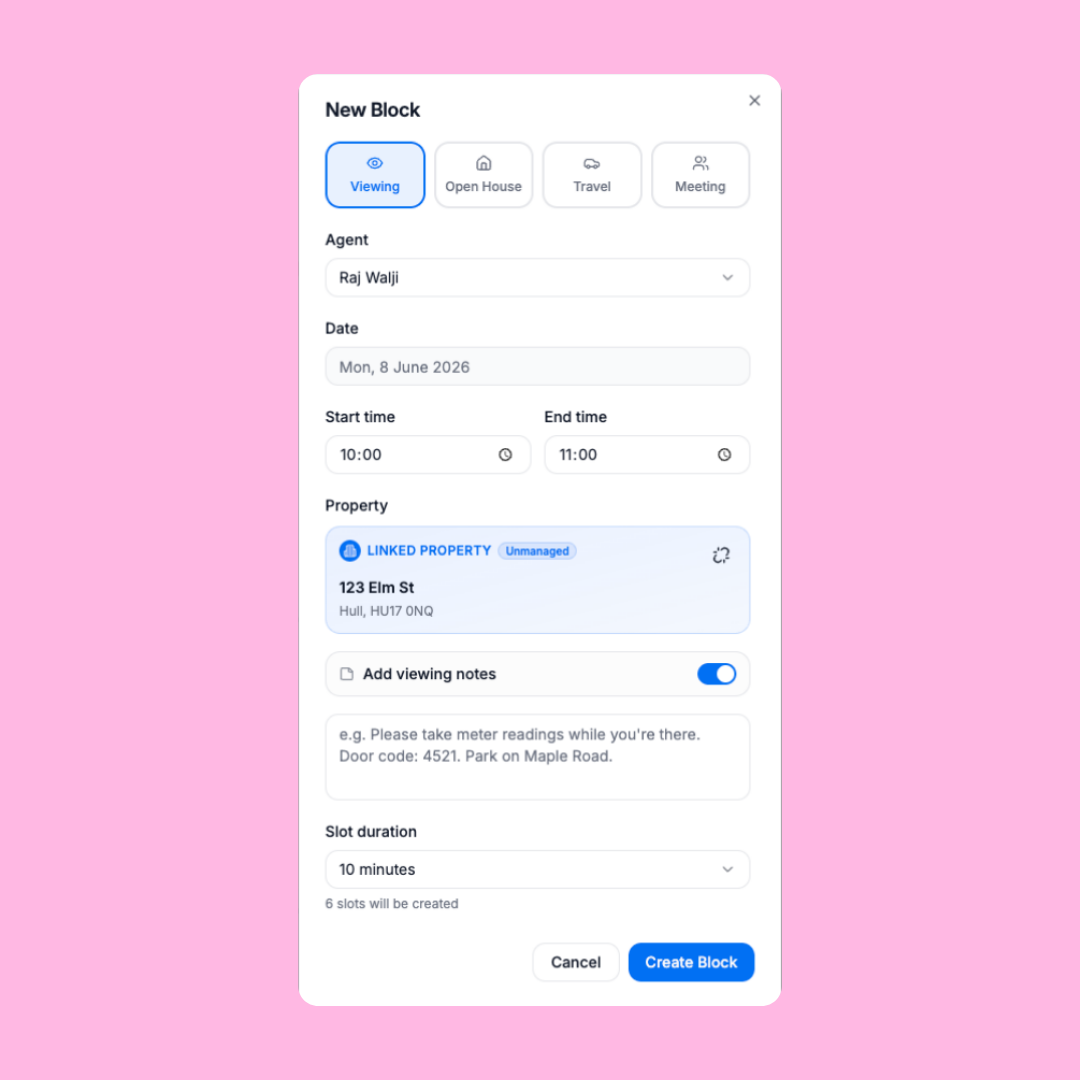
The system supports four distinct block types, each with its own behaviour:
Viewing Blocks: the core unit. An agent visits a property for a set window, and the system automatically generates individual time slots (e.g. every 10 minutes) within that window.
Open House Blocks: for high-demand properties. Instead of fixed time slots, applicants book into a capacity-limited session.
Travel Blocks: reserved time for driving between properties. Sub-types include "Travel & Collect Keys" and "Travel & Return Keys", so the office knows when key handovers are happening.
Meeting Blocks: internal time reservations (such as team meetings) that appear on the agent's diary but are never shown on public booking links.
Why it matters: Traditional systems treat everything as a generic calendar event. By understanding the different types of time an agent uses, the system can make smarter decisions like only generating booking links for viewings, or auto-selecting the office as the location for meetings.
-
In both day and week views, managers can click and drag directly on an agent's timeline to create a new block.
Why it matters: Creating a viewing block takes about three seconds. There's no form to open first, no need to manually type times.
-
Each agent has a configurable weekly schedule: start time, end time, and lunch break for each day of the week. Days can be marked as non-working. On top of the weekly pattern, managers can add date-specific overrides (e.g. "Sarah finishes at 1 pm on Thursday" or "James is off next Friday").
The schedule visually renders these rules directly on the timeline; unavailable hours are shown with a subtle hatched pattern, and lunch breaks appear as labelled blocks that can be clicked to override for a specific date.
Why it matters: The team can see at a glance who's working, who's on lunch, and who's off without needing to check a separate system. Overrides handle the reality that schedules change week to week.
-
Every viewing block generates a shareable link that applicants can use to self-book. The booking page shows the property photo, address, and available dates as a compact date strip. Applicants pick a date, choose a time slot, enter their details, and receive an instant SMS confirmation.
Why it matters: Agents no longer need to spend time on the phone coordinating slot times. The link can be texted, emailed, or posted on property portals. Bookings happen 24/7, even outside office hours.
-
When a viewing is rescheduled, applicants receive an SMS with a rebook link. This opens the same booking page, but pre-filled with their existing details and a banner explaining that their viewing has moved. They can pick a new time or close the page to keep their current slot.
Why it matters: Rescheduling used to mean a phone call and an update to a calendar. Now the entire flow is automated and self-service for the applicant.
-
The system sends bulk SMS reminders for any upcoming viewing date. Each slot tracks whether a reminder has been sent, preventing duplicate messages. If needed, the reminder flag can be manually cleared to allow a resend.
Why it matters: No-shows are one of the biggest time-wasters in lettings. Automated reminders give the office confidence that the right people are being contacted to ensure attendance. -
From within any viewing block, agents can send a custom SMS to all booked viewers, for example, "Your viewer is running 10 minutes late" or "Please use the rear entrance." The system shows the message character count, SMS segment count, and number of recipients before sending.
Why it matters: Real-time communication with applicants used to mean individual text messages or phone calls. Now one message reaches everyone attending a specific viewing in seconds.
-
When a block is rescheduled, whether to a new time, a new date, or both, the system generates a detailed preview. It shows exactly which booked applicants will be affected, what their old and new slot times are, and whether they'll receive an SMS notification.
Agents can toggle SMS on or off for individual applicants. Slots that haven't changed time are automatically set to skip the SMS (no point notifying someone if their 2:00 pm is still at 2:00 pm).
Why it matters: Rescheduling a block with six booked applicants used to be a 20-minute task. Now it's a 30-second operation with full control over who gets notified.
-
Viewing blocks can be extended forwards or backwards, automatically generating new slots in the added time. Blocks can also be trimmed from the start but only if the removed slots are unbooked. The system runs a safety check and blocks the operation if any booked slots would be lost.
Why it matters: Demand changes throughout the day. If a property is popular, agents can extend the block and add more slots without recreating anything. Safety checks prevent accidental data loss.
-
If an agent calls in sick or plans change, their entire viewing block, including all booked applicants and slot details, can be reassigned to another agent with one click. A safety lock prevents accidental reassignment; it must be deliberately unlocked first.
Why it matters: Staff changes shouldn't mean cancelled viewings. The handover is instant and preserves all applicant data.
-
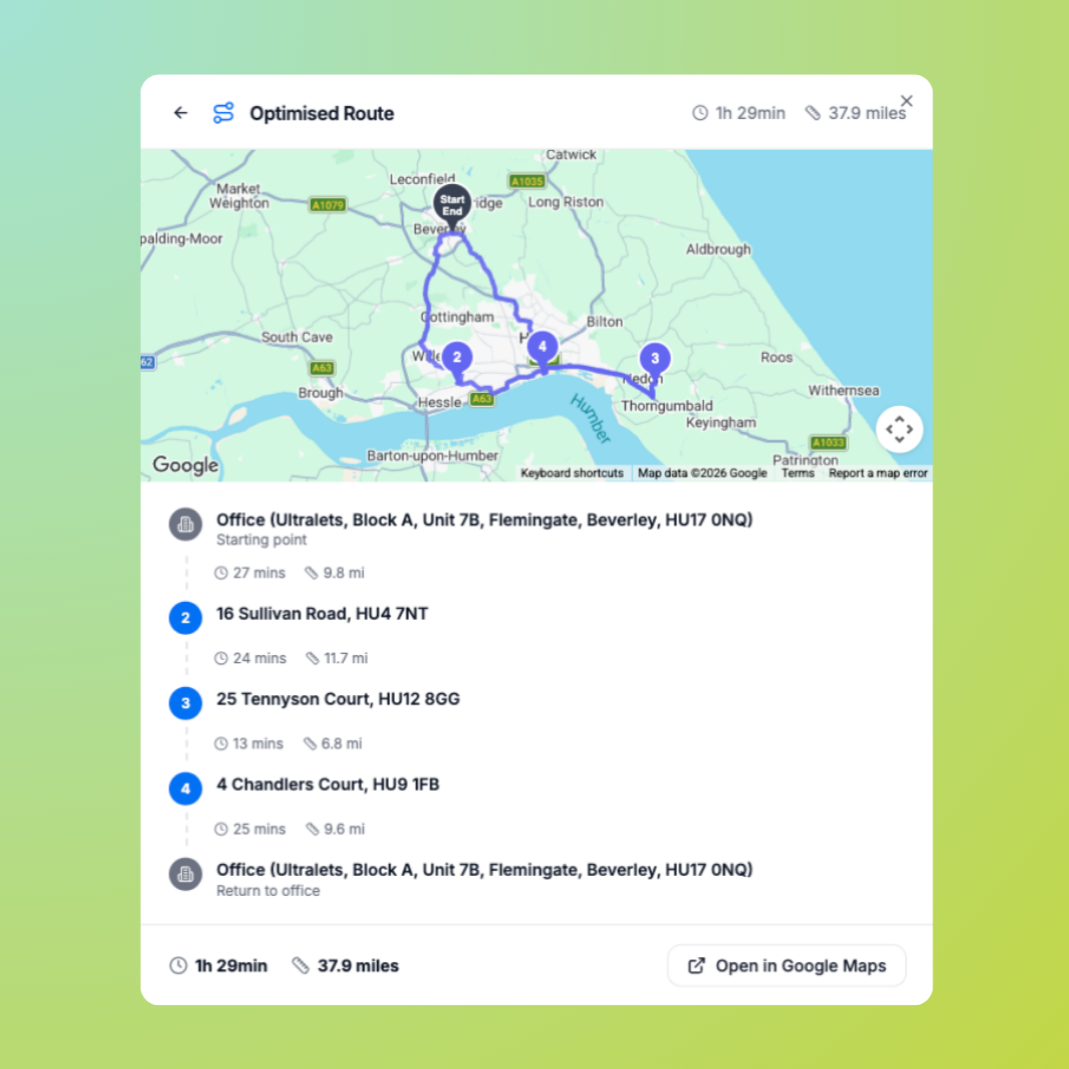
The built-in route planner lets agents select multiple properties from the database and generate an optimised driving route via Google Maps. Routes can optionally start and end at the office. The result shows a map with numbered stops, driving times between each leg, and total journey time and distance with a one-click link to open the route in Google Maps for turn-by-turn navigation.
Why it matters: Agents often visit 4–6 properties in a day. An optimised route can save 30+ minutes of driving time. Having it built into the same system as the schedule means there's no copying addresses between apps.
-
A full reporting dashboard covers any time period such as this month, last month, this year, or custom date ranges. Interactive stat cards show confirmed viewings, cancellations (broken down by "cancelled by us" vs "cancelled by applicant"), and no-shows. Results can be filtered by agent, viewing type (standard viewing vs open house), or status.
Why it matters: Management can track agent performance, identify properties with high no-show rates, and spot trends all without exporting to a spreadsheet.
-
When an applicant calls the office directly, agents can book them into any available slot straight from the block detail view. Bookings made this way are tagged as "Agent" (vs "Public" for self-service bookings), so reporting can distinguish between the two channels.
Why it matters: Not every applicant will use the online booking link. The system supports both self-service and phone-based bookings in the same workflow, with clear attribution for each.
-
Each viewing block supports free-text notes visible to the assigned agent, things like door codes, parking instructions, or reminders to take meter readings. Notes can be added at creation or edited later.
Why it matters: Important context that used to live in internal messages or sticky notes is now attached directly to the viewing where the agent will see it.
-
Every individual slot within a viewing block can be managed independently. Statuses include Available, Booked, Confirmed, Cancelled, and No-show. Applicant details (name, email, phone) can be edited inline, useful when a different person will attend. Cancelled slots can be re-opened and made available again. Individual slots can be deleted to shorten a block.
Why it matters: Granular control means agents handle every scenario without workarounds. The status system captures the full lifecycle of a viewing appointment.
The technology:
The viewings system is fully integrated into Ultralets' property management platform; it reads directly from the property database, knows which agents are available, and communicates with applicants via SMS. There's no data re-entry, no syncing between systems, and no third-party calendar tool to maintain.
The public booking page works on any device and loads instantly. The internal schedule is designed for desktop use in the office, with keyboard shortcuts, drag interactions, and dense information layouts that let experienced users move fast.
The savings:
Assembling a comparable suite of tools using external vendors would incur significant recurring overheads. The projected subscription expenditure for a fragmented setup of this calibre is outlined below:
Estimated monthly software investment:
£1,600 – £1,750
Total annual software expenditure:
£19,200 – £21,000
In addition to eliminating recurring subscription costs, developing a proprietary system offers three significant financial and operational advantages:
Eliminated middleware costs:
Managing a fragmented suite of software often necessitates services like Zapier to synchronise data. Given the scale of Ultralets' operations, automating these workflows externally would likely incur an additional £50–£100 per month in task-based fees.
Real-time data integrity:
External integrations frequently suffer from synchronisation delays. A property updated to "Let Agreed" in the CRM might remain bookable on a third-party page for several minutes, whereas a native solution ensures instant updates and removes the risk of double-bookings.
Scalability without penalties:
Expanding the team with a third-party suite typically triggers immediate price increases across every individual platform on a per-user pricing model. With a custom-built tool, onboarding new agents does not impact the monthly software expenditure.